
Parameter - Manual
|
|
Changes in the 'Parameters' are not effective immediately in the drive. It belongs to the parameter group what you have to do to activate.
|

Overview
| Icon |
Meaning |
|---|---|

|
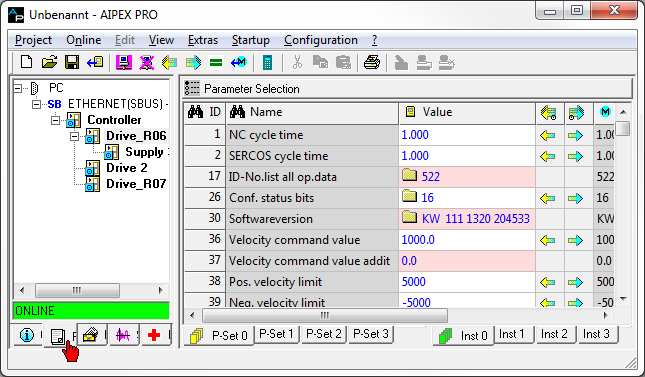
Window: Parameter selection and System internal parameters |

|
Search: ID number |

|
Search: Parameter name |

|
Online value (value which is stored at the AMK device) |

|
Offline value (value which is stored at the PC) |

|
Upload (from device to PC) / |

|
Upload (from device to PC) / Download (from PC to device) complete parameter set |

|
Parameter set |

|
Instance (used for bus parameters) |

|
Selection list input possibilities |

|
List Parameter |

|
Pink background: Read only parameter |
|
Field |
Explanation |
|---|---|
|
ID |
Parameter number |
|
Name |
Designation of the parameter |
|
Value |
Current value of the parameter Folder icon = Parameter list |
|
Unit |
Unit of the parameter |
|
Length |
Data length of the parameter in byte
|
|
Type |
Display of the parameter
|
|
Remark |
Text field, freely usable by the user |
|
Background colour in the column "Value" |
White: Value can be modified Pink: Value cannot be modified (write-protected or formal) |
|
Text colour in the column "Value" |
Blue: Value was modified, but not yet saved Black: Value is unchanged since the last saving Red: This is a system parameter (can be modified only if enabled) |
|
Icon in column "Length" |
Yellow: Parameter is specific for the parameter set Green: Parameter is specific for the instance |
Display and structure of lists
Lists
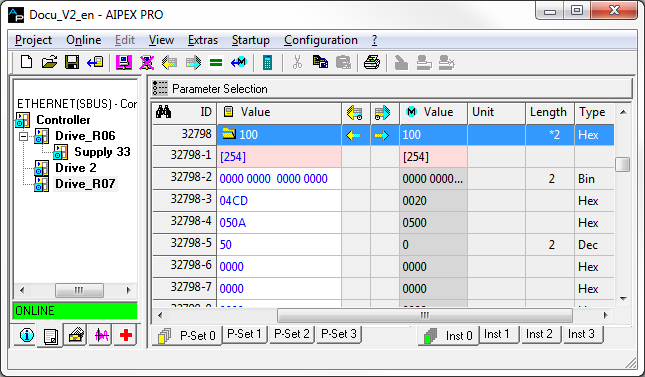
- Lists are indicated by the folder icon in 'Value' column.
- For non-ASCII lists, the number of list elements is indicated next to the icon. For ASCII lists, the text content is displayed here.
- All lists can be displayed in expanded form by a double-click in the 'Value' column. The number of maximum possible list elements is shown in the first line underneath. All further lines display the list content by elements.
- The display of the list elements can be structured by entering own values in the columns lengths (1, 2, 4) and type (Dec, Hex, Bin, Ascii).
Entering values
- The value of modifiable parameters can be edited directly in the table. Each input is completed by pressing the 'Enter'.
- The input needs to be appropriate for the displayed data type.
- Some parameters have a minimum and a maximum limitation of the value. If these are breached during input, an error message is displayed.
Modifying lists
- For non-ASCII lists, entering a value next to the folder icon changes is current list length. The value may not be longer than the maximum list length.
- For ASCII lists, the input next to the folder icon is interpreted as a string and the list is modified appropriately.
- In expandable lists, the list elements can be modified directly. The input needs to be appropriate for the displayed data type of the element or in case none exists, fit the list.
Parameter context menu
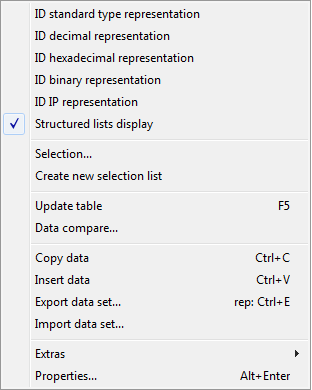
Select the tab 'Parameter'. By selecting any parameter with the right mouse button, the context menu opens.
|
Field |
Explanation |
|---|---|
|
Displaying ID in the standard type |
The selected parameter will be displayed as indicated in the ID Properties . |
|
Display ID decimally |
The selected parameter will be displayed decimally.* |
|
Display ID hexadecimally |
The selected parameter will be displayed hexadecimally.* |
|
Display ID binary |
The selected parameter will be displayed binary.* |
|
Structured list displays |
If 'Show lists with structure' is activated in the context menu, the user can specify 'Name', 'Value', 'Unit length' (e.g. user lists). |
|
Selection |
Opens the window 'Parameter selection'. |
|
Save ID in selection list |
The number of the selected parameter is saved in the currently specified 'own list'. It is of no importance if the 'own list' is active. |
|
Update display |
Updating the online values. All values are discarded and read in anew from the connected drive. |
|
Data compare |
The content of the currently displayed parameter set can be compared with an already saved one. |
|
Download/Copy project parameters set |
With this menu item, the selected parameter is transferred between data set and online device. If the selection is in the column of the device data set, the parameter is copied from the offline data set to the online device. If the selection is in the column of the online data set, the parameter is saved from the online device to the offline data set. The name of the menu item changes, depending on the selected column. |
|
Copy data |
The contents of currently marked parts of the parameter table are copied to the Windows clipboard and thus are available as insertable text for many applications, such as text programs. If complete lines are marked in the table, an internal copy of this parameter is made as well. |
|
Insert data |
If there is an internal copy of parameters, then its content is inserted in the corresponding parameter. If no internal copy exists, then the content of the Windows clipboard is inserted unchecked as text as of the currently selected point in the table. |
| Export data set | |
| Import data set | |
|
Properties |
Display of the properties and attributes of the selected parameters. |
* This excludes ASCII lists
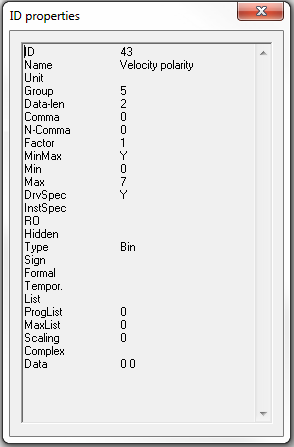
ID Properties
|
ID Properties |
|
|---|---|
|
ID |
Parameter number |
|
Name |
Parameter name |
|
Unit |
Unit |
|
Group |
Parameter group |
|
Data-len |
Data length of the parameter in byte |
|
Comma |
Power of 10 scaling factor X (for 10 to the power of X) |
|
N-Comma |
Decimal places for parameter value display |
|
Factor |
Scaling factor in 10 to the power of X |
|
MinMax |
Minimum value / maximum value available |
|
Min |
Minimum input value |
|
Max |
Maximum input value |
|
DrvSpec |
Drive-specific parameter |
|
InstSpec |
Instance-specific parameter |
|
[Not DrvSpec and not InstSpec = Global parameter] |
|
|
RO |
Read Only |
|
Hidden |
System-internal parameter |
|
Bin |
Input format binary |
|
Hex |
Input format hexadecimal |
|
Ascii |
Input format ASCII |
|
Sign |
Input format signed |
|
Formal |
Process date, entered value are not saved remanent. |
|
Tempor. |
Temporarily adjustable |
|
List |
Parameter is of the type list |
|
ProgList |
Current list length |
|
MaxList |
Maximum list length |
|
Scaling |
Quantification type |
|
Complex |
Type complex list |
|
Data |
Parameter value |
